
Build your portfolio site in minutes with Gatsby Portfolio Story
Posted 04 January, 2020
As a developer or designer, having an online makes it easier to showcase your previous work to prospective employers. In this article, I will walk you through how you can build a blazing fast portfolio site powered by Gatsby. This will be done with the help of a Gatsby starter I wrote.
Let us begin!
You can find the starter on Gatsby's plugin library here.
To use the starter, install the Gatsby CLI if you don't have it installed:
npm install -g gatsby-cliNow that you have the Gatsby CLI installed, create a new Gatsby project with this command:
gatsby new {your-project-name} https://github.com/NodeJSs/gatsby-portfolio-storyOnce you have done that, you should have a new Gatsby project with the gatsby-portfolio-story starter installed. Now you can change your directory to that of the new Gatsby project:
cd {your-project-name}Now run this command to get your local development server running so you can see the starter:
gatsby develop or
npm run developYour server should now be running at localhost:8000.
Your site should look like this
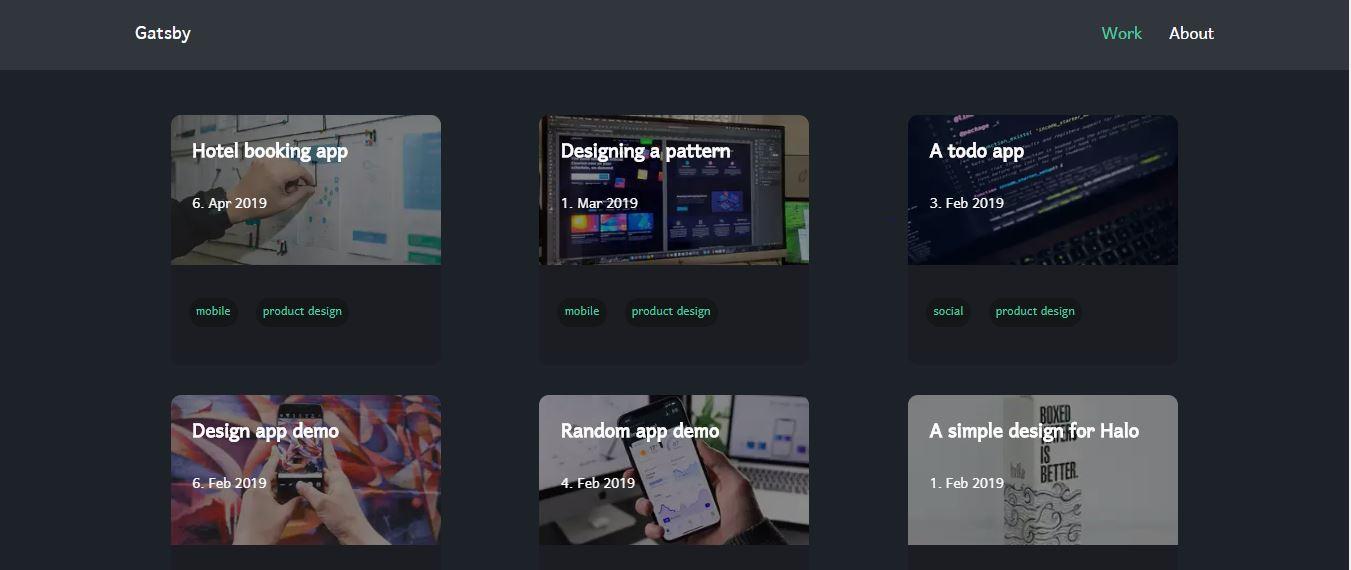
The starter uses Emotion for styling and markdown files for the content(your portfolio). It is also a PWA (Progressive Web App) by default.
Adding your portfolio
Open the content folder in the root directory and study the structure of the folders in it. Each folder in the content folder represents a previous job or work you have done. In each folder, you have a markdown file which contains most of the information about that job and a preview image which will be displayed on the index page.
Let's study one of the mock markdown files
//a-simple-design.md
---
title: A simple design for Halo
date: 2019-02-04
published: true
tags: [mobile, product design]
client: Google
role: Product designer
link: google.com
cover_image: "boxed-water-is-better-7mr6Yx-8WLc-unsplash.jpg"
description: The magic of paint brush and a a little coffee
---

# Mobile app demo

They never said winning was easy. Some people can’t handle success, I can. The key is to drink coconut, fresh coconut, trust me. Give thanks to the most high. Surround yourself with angels. They don’t want us to win. Give thanks
The section of the markdown file sandwiched by a pair of "---" is called the frontmatter. This section contains information about a particular job.
Note: your date should be in the same format shown above.
After filling the frontmatter, you can proceed to write the other parts of your markdown file with a markdown editor or a CMS.
That's basically all what you need to build your portfolio site, you can then host it using Netlify or your preferred method.
You can reach out to me on twitter if you have any problems.